Integrating Redis Caching in FastAPI the Right Way
If your FastAPI app is growing, chances are you’ve noticed response times creeping up. That’s where Redis comes in. Redis is an in-memory data store that makes caching ridiculously fast. In this guide, I’ll show you the cleanest, most modular way to set up Redis for caching in a FastAPI project.
We’ll keep things simple and focus only on caching (Redis can do a lot more, but caching alone is a game-changer).
Step 1: Install Dependencies
Make sure you install the following packages:
pip install aioredis redis[async]
We’ll be using Redis in async mode since FastAPI is built around async I/O.
Step 2: Configure Environment Variables
Create a .env file in your project root. Add the following:
REDIS_HOST=localhost
REDIS_PORT=6379
REDIS_DB=0
REDIS_PASSWORD=""
This allows us to change Redis settings without touching the codebase.
Step 3: Centralize Configs
Inside your project, create a config folder. Then, add conf.py:
import os

redis_host = os.getenv("REDIS_HOST", "localhost")
redis_port = int(os.getenv("REDIS_PORT", 6379))
redis_db = int(os.getenv("REDIS_DB", 0))
redis_password = os.getenv("REDIS_PASSWORD", None)
This ensures all Redis configurations live in one place.
Step 4: Redis Connection Setup
In the same config folder, create a file called cache.py. This will handle all Redis operations (initialize, close, get, set, delete).
from config import conf
from redis.asyncio import Redis

async def init_redis():
    """Initialize Redis connection at app startup"""
    global redis
    redis = Redis(
        host=conf.redis_host,
        port=conf.redis_port,
        db=conf.redis_db,
        password=conf.redis_password,
        decode_responses=True,
    )

async def close_redis():
    """Close Redis connection at app shutdown"""
    global redis
    if redis:
        await redis.close()

async def get_cache(key: str):
    if not redis:
        raise RuntimeError("Redis not initialized. Call init_redis() first.")
    return await redis.get(key)

async def set_cache(key: str, value: str, ttl: int = 300):
    if not redis:
        raise RuntimeError("Redis not initialized. Call init_redis() first.")
    await redis.set(key, value, ex=ttl)

async def delete_cache(key: str):
    if not redis:
        raise RuntimeError("Redis not initialized. Call init_redis() first.")
    await redis.delete(key)
This modular design makes it easy to use Redis anywhere in the project.
Step 5: Wire Redis into FastAPI
Now, let’s connect Redis to our FastAPI app lifecycle so it automatically starts and closes properly.
from config.cache import close_redis, init_redis
from fastapi import FastAPI

async def lifespan(app: FastAPI):
    await init_redis()
    yield
    await close_redis()
app = FastAPI(lifespan=lifespan)
This way, Redis is initialized when the app starts and cleaned up when it shuts down.
Step 6: Create a Caching Utility
We don’t want to repeat Redis logic in every route. Instead, let’s build a decorator that handles caching.
Create a utils folder, create redis_utilities.py:
import json
from functools import wraps

from app.authentication.models import User
from config.cache import get_cache, set_cache
from fastapi.encoders import jsonable_encoder
from sqlalchemy.ext.asyncio import AsyncSession

def cache_response(key_func, ttl=300):
    def decorator(func):
        @wraps(func)
        async def wrapper(*args, **kwargs):
            key = key_func(*args, **kwargs)
            cached = await get_cache(key)
            if cached:
                return json.loads(cached)
            result = await func(*args, **kwargs)
            encoded_result = jsonable_encoder(result)
            await set_cache(key, json.dumps(encoded_result), ttl)
            return result
        return wrapper
    return decorator

def user_cache_key(current_user: User, db: AsyncSession):
    return f"user_profile:{current_user.id}"
How it works:
- cache_response → wraps any function, checks cache first, sets cache if not found.
- user_cache_key → generates a unique cache key per user (useful if your app is user-based).
Step 7: Use Caching in Your API
Here’s how you apply caching in a real FastAPI route:
from utils.redis_utilities import cache_response, user_cache_key
from fastapi import Depends
from sqlalchemy.ext.asyncio import AsyncSession
from app.authentication.models import User
from app.dependencies import get_current_user, get_db

@app.get("/videos")
@cache_response(user_cache_key, ttl=300)
async def get_all_links(
    current_user: User = Depends(get_current_user),
    db: AsyncSession = Depends(get_db)
):
    # Your DB query or heavy logic here
    return {"videos": ["video1", "video2", "video3"]}
✨ Boom. You’ve got caching enabled.
- The user_cache_key (key) ensures uniqueness per user.
- ttl=300 → cache expires in 5 minutes (adjust as needed).
⚡ Performance Boost
Here’s what happens:
- Without Redis → Every request hits the database so Resonse time is 582ms
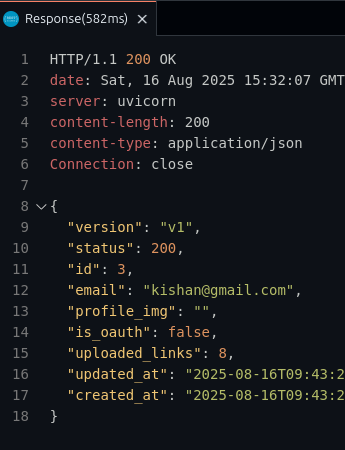
- With Redis → The first request fetches from the database, caches it, and every subsequent request fetches from Redis (much faster) so reponse time is 25ms.

Response times drop drastically.
Cache Invalidation
Remember: caching is powerful, but it must stay fresh.
- When you update or delete data, also call delete_cache(key) to invalidate the old cache.
- This ensures users always get the latest information.
Final Thoughts
We’ve set up a clean, reusable Redis caching system for FastAPI:
- Modular config (conf.py, cache.py)
- Lifecycle management with FastAPI
- A decorator (cache_response) for painless caching
- Per-user cache keys for uniqueness
This setup is scalable, production-ready, and easy to extend.
Now your API is not just fast — it’s blazing fast. ⚡